Best Desk Accessories That Are Actually Useful
Laptop stands, desk pads, cable trays, monitor lights, and a flat-plug power strip compared by the specific desk problem each one solves.
The useful accessory is the one that removes a known annoyance
Buy an accessory only when you can name the annoyance it removes. A laptop stand fixes screen height, a desk pad quiets a hard surface, a cable tray clears the floor, and a flat-plug strip makes power reachable behind a desk. A monitor light bar is worthwhile only if glare or uneven lighting is already a problem.
Our top picks

Nulaxy Adjustable Laptop Stand
An adjustable aluminum laptop stand with a ventilated design and multiple height settings (typically 6 positions from 2.4" to 8.9") that raises a laptop display from flat-desk angle to near eye-level, dramatically reducing the neck flexion that causes strain during long sessions.
- Raising a laptop screen from desk level to eye-level is a meaningful posture change — you stop craning your neck forward and down.
- The aluminum ventilation also prevents laptop thermal throttling during long sessions.
- Folds flat for easy travel or desk clearing.
- Once the screen is elevated, you need a separate keyboard and mouse — otherwise you can't type comfortably at the laptop keyboard.
- This turns a $30 stand into a $30 + $30 mouse + keyboard purchase.
- Check hinge stiffness reviews; cheaper stands can slowly tilt forward under heavier laptops.


Aothia Leather Desk Pad 36x17
A 36x17-inch PU leather desk mat that covers most of a standard desk surface, creating a unified workspace for keyboard, mouse, and wrist rest while protecting the desk from scratches, cup rings, and wear.
- 36x17 is large enough to unify keyboard and mouse in one consistent zone — unlike small mousepads, you never hunt for the edge during fast cursor movement.
- PU leather surface is smooth for mouse glide and easy to wipe clean.
- One of the most underrated desk upgrades for visual appeal vs. cost.
- Check exact desk dimensions: 36" covers most of a 48" desk but leaves bare desk on both edges.
- PU leather can peel along the edges after 2–3 years with heavy use.
- Not machine washable — wipe with a damp cloth.


Quntis Monitor Light Bar
A monitor light bar that clips to the top edge of a monitor and casts light downward onto the keyboard and desk surface, providing focused task illumination without glare on the screen. Color temperature and brightness are adjustable via a touch button.
- Takes zero desk space — mounts directly on the monitor.
- The downward-facing asymmetric beam hits the keyboard without bouncing back off the screen — a problem desk lamps rarely solve well.
- At $30–$50, significantly cheaper than the BenQ ScreenBar while covering the same core use case.
- Compatibility with your monitor's bezel thickness matters — some very thin-bezel monitors don't hold the clip securely.
- Brightness and color temperature adjustment is simpler than premium options.
- No auto-dimming sensor (that's a BenQ ScreenBar feature at 2x the price).

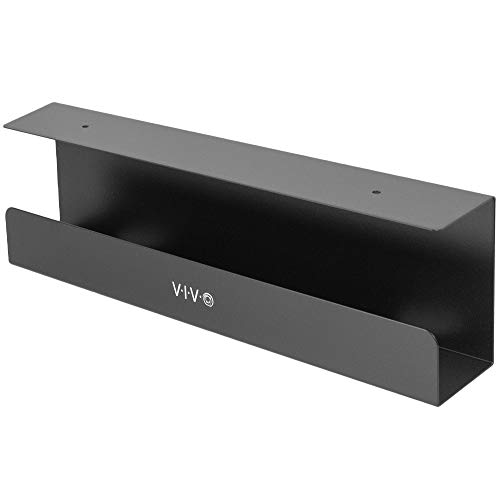
VIVO Under-Desk Cable Management Tray
A steel under-desk cable management tray that mounts to the desk underside and holds power strips, adapters, and cable bundles off the floor and out of sight. Mounts with screws or the included clamp option.
- Hides the power strip and all the power bricks under the desk rather than beside it or on the floor — the visual difference is significant.
- Steel construction holds the weight of multiple adapters and a power strip without flexing.
- At $14–$22, one of the cheapest high-impact desk upgrades available.
- Measure tray depth against your largest power brick — VIVO's tray is approximately 3.5" deep, which handles most standard adapters but may not accommodate very large laptop bricks.
- Drilling into a standing desk frame requires care; verify your desk underside isn't hollow metal before drilling.


TESSAN 5-Foot Flat-Plug Surge Protector
A compact power strip with four AC outlets, one USB-C port, two USB-A ports, a 5-foot cord, and a 0.31-inch right-angle flat plug.

Side by side
A direct comparison across the specs that actually matter for this category.
| Product | Best for | What stands out | Price |
|---|---|---|---|
| Nulaxy Adjustable Laptop StandTop pick | Solopreneurs and remote workers who primarily work from a laptop without an external monitor. Raising the laptop screen from flat-desk angle (looking down ~30°) to closer eye-level is the single cheapest ergonomic fix available — more impact per dollar than most chair upgrades. | Raising a laptop screen from desk level to eye-level is a meaningful posture change — you stop craning your neck forward and down. The aluminum ventilation also prevents laptop thermal throttling during long sessions. Folds flat for easy travel or desk clearing. | $28–$45 |
| Aothia Leather Desk Pad 36x17 | Desks with wood, laminate, or rough surfaces where mouse tracking is inconsistent or the surface scuffs easily. Also the right call for anyone who wants a visually anchored workspace — a desk pad makes the whole setup look intentional rather than assembled from parts. | 36x17 is large enough to unify keyboard and mouse in one consistent zone — unlike small mousepads, you never hunt for the edge during fast cursor movement. PU leather surface is smooth for mouse glide and easy to wipe clean. One of the most underrated desk upgrades for visual appeal vs. cost. | $12–$18 |
| Quntis Monitor Light Bar | Late-night and low-light work sessions where overhead lights create screen glare, or home offices with suboptimal ceiling light placement that makes the monitor hard to see clearly. Particularly useful if your overhead light is directly above or behind the monitor. | Takes zero desk space — mounts directly on the monitor. The downward-facing asymmetric beam hits the keyboard without bouncing back off the screen — a problem desk lamps rarely solve well. At $30–$50, significantly cheaper than the BenQ ScreenBar while covering the same core use case. | $30–$50 |
| VIVO Under-Desk Cable Management Tray | Desks with multiple power adapters, chargers, and cable bundles running visibly to the floor. One install pass typically cleans up 90% of visible desk cable chaos permanently — no routing or cable clips needed beyond the initial setup. | Hides the power strip and all the power bricks under the desk rather than beside it or on the floor — the visual difference is significant. Steel construction holds the weight of multiple adapters and a power strip without flexing. At $14–$22, one of the cheapest high-impact desk upgrades available. | $14–$22 |
| TESSAN 5-Foot Flat-Plug Surge Protector | Desks pushed close to a wall, or small setups that need one reachable charging point for low-power accessories. | The flat plug needs less clearance behind furniture. Four outlets and three USB ports cover a typical laptop-and-accessories setup without turning the desk into a large charging station. | $16–$24 |
Price tiers, honestly explained
Common buying mistakes
Questions worth answering
What gives the fastest visible improvement?
Monitor height fix — a $15–$25 riser or a monitor arm puts screen at eye level and removes the neck angle that causes fatigue. Most people feel the difference within an hour of adjusting it.
Should I buy accessories as a kit or individually?
Individually. Desk accessory kits optimize for price perception, not for your actual setup. Know the one friction you're solving, buy for that, and stop. Unused accessories just become clutter.
How do I decide which accessory to buy first?
Identify what you notice most during a work session. Cables everywhere? Start with cable management. Neck craning down at your screen? Start with monitor height. Buying for the actual bottleneck beats buying for the aesthetic goal every time.
Nulaxy Adjustable Laptop Stand
An adjustable aluminum laptop stand with a ventilated design and multiple height settings (typically 6 positions from 2.4" to 8.9") that raises a laptop display from flat-desk angle to near eye-level, dramatically reducing the neck flexion that causes strain during long sessions.