Best Desk Lamps for Home Office Solopreneurs
Compare 6 desk lamps: SKYLEO for everyday work, HaFundy under $30, KableRika for wide desks and BenQ ScreenBar Halo 2 for monitor lighting.
Good desk lighting reduces eye fatigue — the right choice depends on your desk and habits
SKYLEO is our default pick for a normal home-office desk. HaFundy is the cheaper option, KableRika makes more sense for a wide or dual-monitor desk, and BenQ ScreenBar Halo 2 keeps the desktop clear by mounting on the monitor. Check where the lamp will sit or clamp before comparing brightness modes; poor placement can create glare no matter how many settings it has.
Our top picks
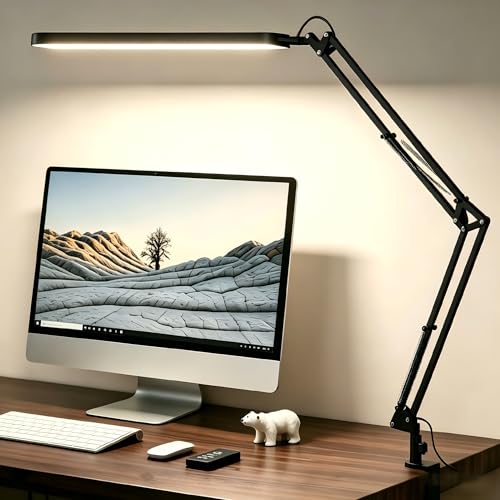
SKYLEO LED Desk Lamp for Home Office
An LED desk lamp with 5 color modes (3000K–6000K), 11 brightness levels, a memory function that recalls your last setting on power-on, and a fully adjustable swing arm with a 45-minute timer. USB powered.
- The memory function means no resetting brightness and color temperature each time you turn it on.
- The adjustable swing arm fits varied desk sizes and angles without glare.
- Anti-glare diffuser reduces eye strain over long working sessions.
- USB powered — you'll need an available USB port or adapter.
- The swing arm requires periodic tightening if you reposition frequently.


HaFundy LED Desk Lamp with Adjustable Eye-Caring Brightness
A gooseneck-style LED desk lamp with 3 color modes (warm to cool white), 10 brightness levels, and a flexible arm that can be positioned precisely. USB charging port on the base.
- The gooseneck design means you can position light exactly where you need it — over a document, a laptop screen, or a notebook.
- At this price point, the combination of adjustable color and brightness is genuinely competitive.
- The base isn't weighted enough to prevent tipping if the arm is fully extended at an angle.
- Use both hands to adjust the arm initially.
- The USB port charges slowly (5W) — it's for topping up, not fast charging.


KableRika Double Light LED Desk Lamp
A double-head LED desk lamp with two adjustable light bars spanning up to 27.8 inches when fully extended. Provides even full-desk coverage without the harsh center-bright effect of single-head lamps.
- The 27.8-inch wingspan is genuinely useful for wide desks — one lamp replaces two.
- Each head can be independently angled to cover specific areas.
- The even light distribution reduces the contrast eye strain that comes from single-point light sources.
- The lamp arm requires a reasonably wide desk to accommodate the fully extended position.
- Assembly takes 10-15 minutes.
- The touch controls on the base are responsive but require line-of-sight to see which setting you're selecting.


Pzlo LED Desk Lamp with 25 Combination Modes
An LED desk lamp with 5 color temperatures and 5 brightness levels for 25 possible combinations, a memory function that remembers your last setting, and a USB-C charging port on the base.
- The memory function is genuinely useful — most cheaper lamps reset to full brightness every time they're unplugged.
- USB-C is faster than USB-A for charging.
- The 180-degree adjustable head lets you direct light exactly where needed without moving the whole lamp.
- The lamp is slightly front-heavy when the arm is fully extended — make sure the base has enough grip on your desk surface.
- USB-C port is for charging small devices only, not laptops.


Airlonv LED Desk Lamp with Gooseneck and Clamp Base
A clamp-base gooseneck LED desk lamp that attaches to desk edges rather than sitting on the desk surface, freeing up all your desk space. 3 color modes and adjustable brightness.
- The clamp mount means it attaches to desk edges up to 2.5 inches thick — works on most standing desk frames.
- The gooseneck is fully positionable.
- Since it doesn't sit on the desk, it leaves the entire work surface clear for materials.
- The clamp requires a desk edge to attach to — won't work on a bed headboard or other surfaces.
- Maximum clamping thickness is 2.5 inches.
- Make sure the desk edge is strong enough to support the lamp's weight at arm extension.


BenQ ScreenBar Halo 2 LED Monitor Light Bar
A premium LED monitor light bar that clips onto your monitor's top edge — no desk space required. The ScreenBar Halo 2 adds a rear glow panel for backlight bias, plus a wireless puck controller. Asymmetric optics light your desk without hitting the screen.
- The asymmetric light design is genuinely different from desk lamps — it lights your desk where you need it without creating the glare reflections that cause eye fatigue.
- Mounts on the monitor so it takes zero desk space.
- The difference is noticeable within one work session.
- Requires a monitor top ridge thick enough to clamp — check compatibility with your monitor.
- At this price point it's a significant investment.
- Only worth it if screen glare and eye strain are daily problems.

Side by side
A direct comparison across the specs that actually matter for this category.
| Product | Best for | What stands out | Price |
|---|---|---|---|
| SKYLEO LED Desk Lamp for Home OfficeTop pick | Solopreneurs who spend 8+ hours at their desk and want consistent, eye-friendly lighting that doesn't need to be reconfigured every morning. | The memory function means no resetting brightness and color temperature each time you turn it on. The adjustable swing arm fits varied desk sizes and angles without glare. Anti-glare diffuser reduces eye strain over long working sessions. | $18–$26 |
| HaFundy LED Desk Lamp with Adjustable Eye-Caring Brightness | Solopreneurs on a budget who want adjustable lighting without a big investment, or as a second lamp for a dual-monitor setup. | The gooseneck design means you can position light exactly where you need it — over a document, a laptop screen, or a notebook. At this price point, the combination of adjustable color and brightness is genuinely competitive. | $18–$28 |
| KableRika Double Light LED Desk Lamp | Solopreneurs with dual monitors, large desks, or those who spread multiple documents and materials across a wide workspace. | The 27.8-inch wingspan is genuinely useful for wide desks — one lamp replaces two. Each head can be independently angled to cover specific areas. The even light distribution reduces the contrast eye strain that comes from single-point light sources. | $40–$55 |
| Pzlo LED Desk Lamp with 25 Combination Modes | Solopreneurs who want a configurable lamp with modern USB-C and don't need the extra features of premium models. | The memory function is genuinely useful — most cheaper lamps reset to full brightness every time they're unplugged. USB-C is faster than USB-A for charging. The 180-degree adjustable head lets you direct light exactly where needed without moving the whole lamp. | $62–$78 |
| Airlonv LED Desk Lamp with Gooseneck and Clamp Base | Solopreneurs with small desks, standing desk converters, or anyone who wants zero desk-space usage from their lamp. | The clamp mount means it attaches to desk edges up to 2.5 inches thick — works on most standing desk frames. The gooseneck is fully positionable. Since it doesn't sit on the desk, it leaves the entire work surface clear for materials. | $22–$36 |
| BenQ ScreenBar Halo 2 LED Monitor Light Bar | Solopreneurs who work primarily on screens all day and want to eliminate the #1 cause of eye strain: screen reflection from overhead and nearby lights. | The asymmetric light design is genuinely different from desk lamps — it lights your desk where you need it without creating the glare reflections that cause eye fatigue. Mounts on the monitor so it takes zero desk space. The difference is noticeable within one work session. | $185–$210 |
Price tiers, honestly explained
Common buying mistakes
Questions worth answering
Does a desk lamp actually reduce eye strain?
Yes — but only if positioned correctly. A lamp that's too bright, creates screen glare, or is pointed at your eyes will cause more strain than no lamp. The goal is supplementing ambient light to eliminate shadows and contrast without creating new glare sources.
What's the best desk lamp for working on a laptop?
For laptop work, a clamp-mount lamp is often the best choice because laptops have limited screen brightness and your face is closer to the screen — a standard desk lamp positioned to the side can actually create more glare. A clamp lamp that positions light over the laptop's keyboard area (not the screen) is the ideal setup.
Can I use a desk lamp with a standing desk?
Yes, but verify the lamp's base can handle movement if you're switching between sitting and standing. A clamp-mount lamp attached to the desk frame works better than a weighted-base lamp on a standing desk, which can tip during transitions.
What's the ideal color temperature for a home office?
For daytime work: 5000K-6500K (cool white) to support alertness. For evening work or after 6pm: 2700K-3000K (warm white) to avoid suppressing melatonin before sleep. Many lamps now let you switch between these with a single button.
SKYLEO LED Desk Lamp for Home Office
An LED desk lamp with 5 color modes (3000K–6000K), 11 brightness levels, a memory function that recalls your last setting on power-on, and a fully adjustable swing arm with a 45-minute timer. USB powered.