Desk Setup Under $1000 for Solopreneurs
A $1,000 desk stack: FLEXISPOT EN2 standing desk (4.6★, 2,244 reviews, $210–$260), a monitor arm, and the Logitech MX Master 3S mouse for cleaner cable flow.
Build around the chair, desk and monitor before adding peripherals
A $1,000 budget is enough for a stable desk, a chair that fits, and a monitor positioned at a comfortable height. Spend on those three foundations before upgrading the keyboard or mouse. If your current chair already fits well, move that money to the monitor and lighting; otherwise, the chair should take the largest share of the budget.
Our top picks
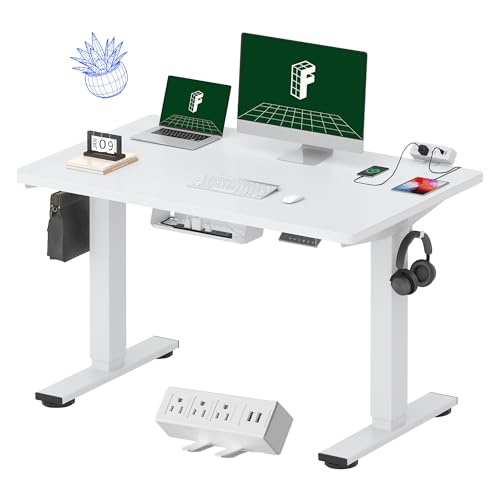
FLEXISPOT EN2 Electric Standing Desk
The linked EN2 has a 48-by-30-inch one-piece desktop, four height presets, and a removable strip with three power outlets and two USB ports. Its listed height range is 28.1 to 45.7 inches.


Logitech MX Master 3S Wireless Mouse
Logitech's flagship productivity mouse with an ergonomic contoured shape, MagSpeed electromagnetic scroll wheel, 7 programmable buttons, and Easy-Switch for pairing up to 3 devices. USB-C rechargeable. Works with Logi Options+ for custom button mapping per application.
- The MagSpeed scroll wheel is genuinely different — it free-spins through long documents at 1,000 lines per second or clicks precisely through spreadsheet rows.
- Quiet click is noticeably better in calls.
- Consistently the top pick from Wirecutter and The Verge for productivity mice.
- Right-hand only, medium-to-large hands.
- At $80–$100, the price is real — this isn't a sale item.
- Logi Options+ software adds significant value but requires installation.
- Multi-device pairing works via Bluetooth or the USB Unifying receiver (one port).

Side by side
A direct comparison across the specs that actually matter for this category.
| Product | Best for | What stands out | Price |
|---|---|---|---|
| FLEXISPOT EN2 Electric Standing DeskTop pick | A workstation needing more front-to-back space than a 24-inch-deep desk, without adding width. | The 30-inch depth leaves more room between the screen and keyboard. The power strip clips to the back or side, and the listing specifies a 176-pound load limit. | $210–$260 |
| Logitech MX Master 3S Wireless Mouse | Solopreneurs spending 6+ hours daily in a mix of documents, spreadsheets, code editors, and browser tabs. The programmable buttons and MagSpeed scroll wheel measurably reduce the micro-friction of repetitive actions — switching apps, scrolling through long docs, triggering shortcuts. | The MagSpeed scroll wheel is genuinely different — it free-spins through long documents at 1,000 lines per second or clicks precisely through spreadsheet rows. Quiet click is noticeably better in calls. Consistently the top pick from Wirecutter and The Verge for productivity mice. | $113–$142 |
Price tiers, honestly explained
Common buying mistakes
Questions worth answering
What gives the fastest improvement in a $1000 setup?
A proper ergonomic chair plus a monitor arm together. They eliminate the two most common posture complaints — seat pan discomfort and neck angle. Get these right before adding the standing desk.
Should I prioritize standing desk or ergonomic chair first?
Chair first. You sit more than you stand, even with a sit-stand desk. A $300 chair plus a basic fixed desk will outperform a $400 standing desk with a cheap chair on day-to-day comfort.
How do I pick between two similar standing desk frames at this budget?
Check frame wobble at max height (search recent reviews specifically for "wobble" or "shake"), weight capacity vs. your actual monitor/gear load, and warranty length. At $700–$1000, there's no reason to accept a 1-year warranty — it's a signal about build quality.
FLEXISPOT EN2 Electric Standing Desk
The linked EN2 has a 48-by-30-inch one-piece desktop, four height presets, and a removable strip with three power outlets and two USB ports. Its listed height range is 28.1 to 45.7 inches.