Desk Setup Under $500 for Solopreneurs
A complete desk setup under $500: BestOffice ergonomic chair (4.3★), ErGear electric standing desk (4.5★, 5K+ reviews, $125–$157), and an Anker vertical mouse.
At $500, posture and screen height should take the budget
With $500, prioritize the parts that set your posture: a chair that matches your dimensions, a desk at the right working height, and a stand or arm that brings the screen up. Skip decorative accessories until those are settled. If you already own a suitable desk, put the savings into the chair rather than filling the budget with smaller upgrades.
Our top picks
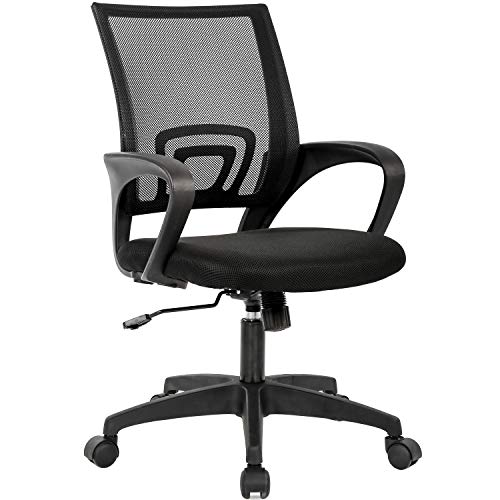
BestOffice Ergonomic Mid-Back Chair
A mid-back mesh task chair with basic lumbar support, height adjustment, and flip-up armrests. BestOffice is a budget brand with no premium positioning — this chair exists to give you ergonomic fundamentals at a price that doesn't require a budget justification.
- At $35–$45, the risk of trying it is relatively low.
- The mesh back breathes better than foam for long sessions.
- Flip-up arms mean you can tuck the chair under a desk easily.
- This is a budget chair — the build quality reflects that.
- The lumbar support is fixed, not adjustable.
- It won't fit tall users (above 6'2") well, and the seat cushion compresses over time.
- This is a functional placeholder, not a long-term investment.
- If you can spend $150–$200, the ergonomic chairs on our dedicated guide are significantly better.


ErGear Height Adjustable Electric Standing Desk
An electric height-adjustable standing desk with programmable memory presets and a quiet dual-motor lift system. Compact footprint (typically 48" wide) fits most home offices without dominating the room.
- Electric motor with memory presets means you'll actually use the height adjustment — manual-crank desks typically don't get used.
- The ROI is real: if you currently sit all day and switch to 50/50 sit-stand, the difference in how you feel at 4pm is noticeable within a week.
- Check wobble reviews at standing height — this is the main trade-off vs. premium desks.
- Stable for laptop + one monitor; may wobble with heavy multi-monitor rigs.
- Measure your space first: standard model is 48", a 55" version is available at similar pricing.


Anker 2.4G Wireless Vertical Ergonomic Optical Mouse
A 2.4G wireless vertical mouse that positions your hand in a handshake grip (57-degree tilt) to reduce forearm rotation and wrist strain during long sessions. Adjustable DPI (800/1200/1600), USB nano-receiver.
- At ~$20, the downside risk is low.
- The same ergonomic principle behind $130 Evoluent mice is present here at a fraction of the cost.
- Thousands of reviewers report real wrist relief within a week of switching.
- Right-hand only, medium-to-large hands.
- Takes one USB port for the nano-receiver.
- Scroll wheel resistance takes a few days to get used to.

Side by side
A direct comparison across the specs that actually matter for this category.
| Product | Best for | What stands out | Price |
|---|---|---|---|
| BestOffice Ergonomic Mid-Back ChairTop pick | Anyone currently sitting in a dining chair, a hand-me-down, or a chair with no lumbar support for 6+ hours a day. The step up from zero ergonomics to basic ergonomics has the highest return in this category. | At $35–$45, the risk of trying it is relatively low. The mesh back breathes better than foam for long sessions. Flip-up arms mean you can tuck the chair under a desk easily. | $35–$45 |
| ErGear Height Adjustable Electric Standing Desk | Solopreneurs who already have a reasonable chair and want the next upgrade: sit-stand capability. Alternating between sitting and standing every hour addresses back fatigue and afternoon energy drops. The ErGear delivers this at $120–$200 vs. $400–$600 for premium brands. | Electric motor with memory presets means you'll actually use the height adjustment — manual-crank desks typically don't get used. The ROI is real: if you currently sit all day and switch to 50/50 sit-stand, the difference in how you feel at 4pm is noticeable within a week. | $125–$157 |
| Anker 2.4G Wireless Vertical Ergonomic Optical Mouse | Anyone who already has the chair and desk sorted and wants to address wrist or forearm fatigue. Buy this last — it's the lowest-cost ergonomic upgrade and works best as a complement to a good chair, not a substitute for one. | At ~$20, the downside risk is low. The same ergonomic principle behind $130 Evoluent mice is present here at a fraction of the cost. Thousands of reviewers report real wrist relief within a week of switching. | $20–$30 |
Price tiers, honestly explained
Common buying mistakes
Questions worth answering
What gives the fastest improvement under $500?
Chair fit and monitor height, in that order. A $150–$180 chair upgrade plus a $25 monitor riser often delivers more daily improvement than a standing desk at three times the cost.
Should I buy a bundle or individual pieces?
Individual pieces. Bundles optimize for price optics, not for your specific bottleneck. Know which friction you're solving first, then buy the piece that solves it.
How do I split $500 between chair, desk, and accessories?
Default split: $150–$200 on chair, $80–$120 on monitor position (arm or riser), $50–$80 on lighting and cable cleanup. Only shift budget toward a standing desk if you already have a decent chair — ergonomics beat motorized movement for most people.
BestOffice Ergonomic Mid-Back Chair
A mid-back mesh task chair with basic lumbar support, height adjustment, and flip-up armrests. BestOffice is a budget brand with no premium positioning — this chair exists to give you ergonomic fundamentals at a price that doesn't require a budget justification.